MCP for ERP: How AI Agents Securely Connect with Moqui, Apache OFBiz, OMS, and WMS
Enterprise AI has moved beyond dashboards and chatbots. Business leaders now want AI agents that can check inventory, validate orders, trigger warehouse actions, review exceptions, and support decisions inside ERP systems. The real question is not whether an AI agent can understand a request. The real question is whether it can safely execute that request inside systems like Moqui, Apache OFBiz, Order Management Systems, and Warehouse Management Systems without bypassing permissions, corrupting data, or creating operational risk.
This is where MCP for ERP becomes important. The Model Context Protocol gives AI applications a structured way to connect with external systems, tools, data, and workflows. In ERP, MCP can act as the controlled connection layer between an AI agent and business services such as order allocation, shipment creation, inventory lookup, invoice matching, replenishment planning, and warehouse task generation.
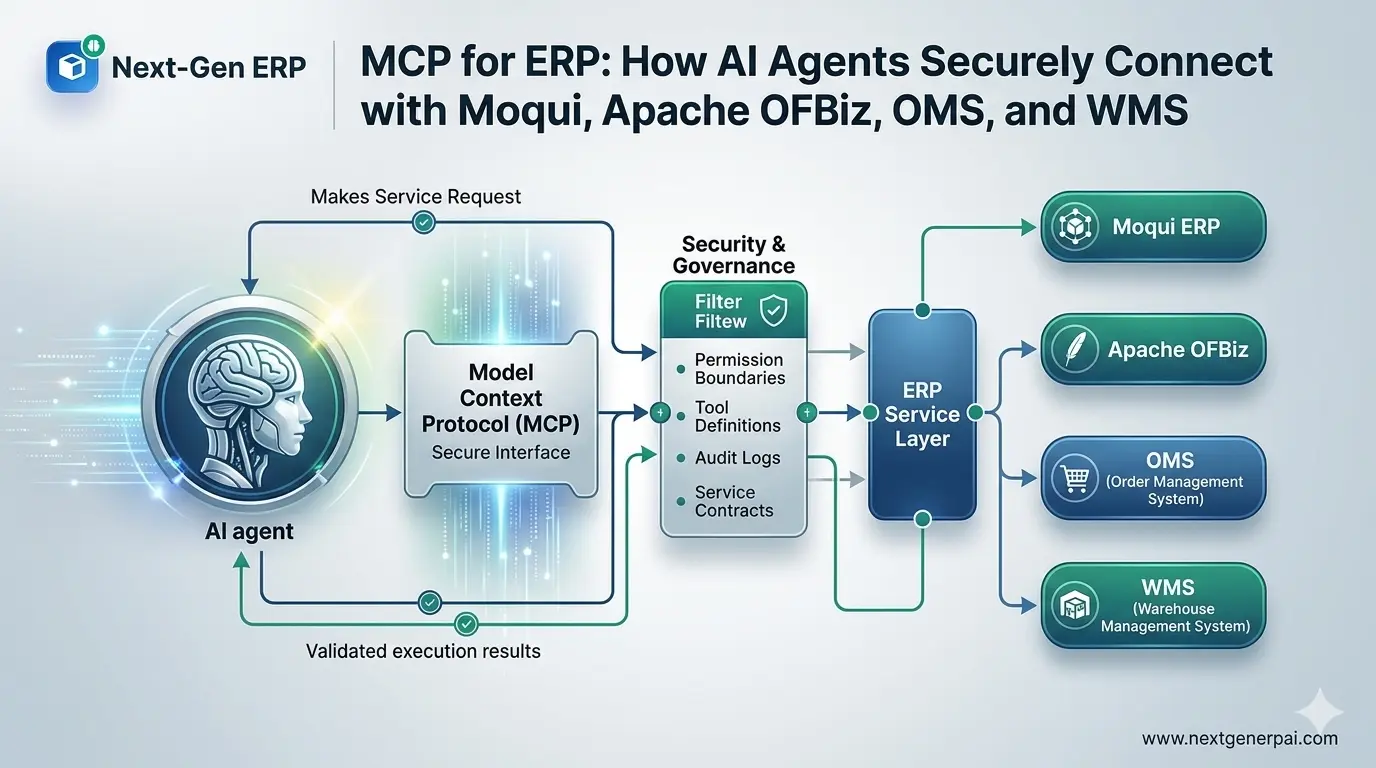
For companies building future-ready ERP systems, Next-Gen ERP sees MCP as more than a technical connector. It is a practical foundation for secure AI agent integration across service-oriented ERP platforms like Moqui and Apache OFBiz, especially when combined with permission boundaries, tool definitions, audit logs, and clear service contracts.
Quick Answer: What Is MCP for ERP?
MCP for ERP is a secure integration pattern where AI agents use the Model Context Protocol to discover and execute approved ERP services through controlled tools. Instead of giving an AI agent direct database access or unrestricted API access, MCP exposes specific ERP actions as defined tools with clear inputs, outputs, permissions, and business rules.
In simple terms, MCP helps AI agents ask, “What am I allowed to do inside the ERP, what information do I need, and which approved service should I call?”
For example, an AI agent should not directly update inventory tables. It should call an approved inventory adjustment service that already validates permissions, checks stock rules, records the transaction, and creates an audit trail. That is the difference between risky AI automation and enterprise-grade agentic ERP architecture.
Why Traditional ERP Integrations Are Not Enough for AI Agents
Most ERP integrations were designed for predictable system-to-system communication. A sales channel sends an order to an OMS. A WMS sends shipment confirmation back to ERP. A finance system receives invoice data. These integrations are useful, but they are usually static, pre-mapped, and built around fixed workflows.
AI agents behave differently. They interpret goals, evaluate context, choose the next step, and may need to call multiple services in sequence. For example, an agent handling an order delay may need to check payment status, inventory availability, carrier cutoff time, warehouse capacity, customer priority, and substitution rules before recommending or executing an action.
That kind of AI agent integration needs a safer control layer. MCP gives enterprises a way to expose ERP capabilities as tools while keeping the actual execution inside the ERP’s service layer. This matters especially for AI agent development services, where the objective is not just automation but controlled business execution.
How MCP Works in an ERP Architecture
MCP does not replace ERP APIs, service engines, workflow engines, or role-based access control. It sits above them as an interaction layer that lets AI agents discover and call approved capabilities in a structured way.
| MCP Layer | ERP Role | Why It Matters |
|---|---|---|
| MCP Host | The AI application or agent environment | Starts the interaction and manages the user experience |
| MCP Client | The connector inside the AI application | Communicates with approved MCP servers |
| MCP Server | The controlled ERP-facing service gateway | Exposes approved ERP tools, resources, and workflows |
| ERP Service Layer | Moqui services, OFBiz services, OMS APIs, WMS APIs | Performs the actual business execution |
| Security Layer | RBAC, approval rules, audit logs, policy checks | Ensures the agent only performs authorized actions |
A well-designed MCP ERP architecture should make the agent useful without making it dangerous. The agent can reason and suggest actions, but the ERP service layer remains responsible for validating and executing business rules.
Moqui MCP: Why Moqui Is a Strong Fit for Agentic ERP
Moqui is well suited for MCP-based AI execution because it is built around a service-oriented ERP architecture. The Moqui Framework supports enterprise application development with service logic, data access, workflow capabilities, security, and integration patterns that make it practical to expose ERP actions through controlled service contracts.
In a Moqui MCP setup, the MCP server can map selected Moqui services into AI-callable tools. For example, a service such as getOrderStatus, reserveInventory, createPicklist, or approvePurchaseRequisition can be exposed with a defined schema, permission requirement, and expected response format.
This makes Moqui ERP development and consultancy especially relevant for businesses that want AI agents to work inside ERP without weakening governance. Instead of building loose automation scripts, enterprises can build AI-ready service contracts around Moqui’s existing business logic.
A practical Moqui MCP flow may look like this:
- A user asks an AI agent to check whether a delayed order can still ship today.
- The agent calls an approved MCP tool connected to Moqui order services.
- Moqui validates permissions and retrieves order, inventory, payment, and warehouse status.
- The agent identifies the available options and recommends the safest next action.
- If execution is allowed, the agent calls a controlled service such as shipment prioritization or warehouse task creation.
- Moqui records the transaction, user context, service result, and audit history.
This is exactly the kind of pattern discussed in Next-Gen ERP’s related guide on how AI agents execute Moqui services autonomously using MCP.
Apache OFBiz and MCP: Bringing AI Agents to Mature ERP Services
Apache OFBiz is a mature open-source ERP framework with modules for accounting, order management, e-commerce, warehousing, inventory, manufacturing, and related business operations. The official Apache OFBiz project highlights its flexible architecture, service engine, entity engine, and extensibility, which makes it a strong candidate for AI agent integration.
For OFBiz-based systems, MCP can expose selected OFBiz services as AI tools without giving the agent unrestricted system access. This is important because many OFBiz implementations support complex operations with custom workflows, legacy extensions, and industry-specific business rules.
With Apache OFBiz ERP development services, businesses can create an MCP server that wraps approved OFBiz services, applies permission checks, validates tool inputs, and logs every agent-triggered action. The result is a safer bridge between AI reasoning and OFBiz execution.
For example, an AI agent might be allowed to read open orders, check stock availability, and suggest fulfillment changes. But it may require manager approval before changing credit limits, cancelling orders, modifying invoices, or overriding warehouse allocation rules.
MCP for OMS: AI Agents That Understand Order Context
Order Management Systems are a natural starting point for MCP ERP because order workflows involve decisions, exceptions, and coordination across multiple systems. In a modern OMS, AI agents can help teams manage late orders, split shipments, payment holds, return requests, backorders, substitutions, and customer service questions.
When MCP is connected to modern order management systems, each agent action can be tied to an approved tool. The agent can retrieve order status, check fulfillment rules, identify risk, and recommend actions without directly manipulating core records.
| OMS Use Case | MCP Tool Example | Safe Execution Boundary |
|---|---|---|
| Order status lookup | get_order_status | Read-only access based on user role |
| Inventory promise check | check_available_to_promise | Returns options without reserving stock |
| Backorder review | analyze_backorder_options | Suggests substitution or split shipment |
| Order hold release | release_order_hold | Requires permission or human approval |
| Shipment prioritization | prioritize_shipment | Executes only within approved SLA rules |
This is where AI becomes genuinely useful for order operations. It does not just summarize order data. It helps users act on it. For a deeper view of this direction, read Next-Gen ERP’s article on autonomous order management.
MCP for WMS: Safer AI Execution in Warehouse Operations
Warehouse operations are fast-moving, physical, and highly sensitive to bad automation. A wrong warehouse action can create stock mismatches, missed shipments, labor waste, or customer dissatisfaction. That is why MCP for WMS should be designed with strict execution boundaries.
When AI agents connect with AI-powered warehouse management systems, they should interact through controlled tools such as stock lookup, pick task recommendation, slotting analysis, replenishment suggestion, cycle count review, and exception triage.
| WMS Use Case | Agent Role | Execution Control |
|---|---|---|
| Picking delay analysis | Finds blocked waves or labor bottlenecks | Read-only until supervisor approves changes |
| Replenishment suggestion | Recommends movement from reserve to pick face | Executes only through approved replenishment service |
| Cycle count exception | Compares expected and counted quantities | Adjustment requires approval and audit reason |
| Slotting optimization | Suggests better product locations | Change request can be queued for warehouse manager |
| Shipment exception | Identifies missing items or carrier issues | Agent can escalate, not override rules silently |
MCP works best in WMS when it respects warehouse discipline. AI agents should support operators, planners, and supervisors, but the WMS should remain the system of record. This is also why strong inventory management solutions are essential before attempting autonomous warehouse execution.
Next-Gen ERP’s related article on autonomous warehouse management explains how AI agents can optimize inventory in real time when the underlying data and execution controls are reliable.
The Security Model: Permission Boundaries, Tool Definitions, and Service Contracts
A secure MCP ERP implementation depends on three practical design choices: permission boundaries, tool definitions, and service contracts. These are not optional technical details. They are what make the difference between an AI demo and a production-ready ERP architecture.
| Security Element | What It Means | ERP Example |
|---|---|---|
| Permission boundary | Defines what the agent can access or execute | Sales agent can view orders but cannot approve refunds |
| Tool definition | Describes the exact tool, input schema, output schema, and purpose | create_pick_task(orderId, warehouseId, priority) |
| Service contract | Defines business rules, validation, errors, and transaction behavior | Shipment creation checks stock, payment, carrier, and warehouse status |
| Human approval | Requires user confirmation for sensitive actions | Credit override or invoice cancellation |
| Audit trail | Records agent, user, time, tool call, input, output, and result | Every agent-triggered service call is traceable |
| Rate and scope control | Limits volume, frequency, and operational scope | Agent cannot bulk-cancel orders or mass-adjust inventory |
The safest approach is simple: never let the AI agent do anything that the ERP service layer would not allow a human user to do. The MCP server should expose business capabilities, but the ERP should enforce business rules.
API-Driven ERP vs MCP ERP
API-driven ERP and MCP ERP are not competitors. In fact, MCP works best when the ERP is already API-driven and service-oriented. The difference is in how the AI agent discovers, understands, and calls those services.
| Area | Traditional API-Driven ERP | MCP ERP |
|---|---|---|
| Primary user | Applications and integrations | AI agents and AI-enabled applications |
| Interaction style | Predefined API calls | Tool discovery and structured tool execution |
| Flexibility | Good for fixed workflows | Better for context-aware agent workflows |
| Security need | API auth, scopes, RBAC | API auth plus tool safety, consent, approval, and audit |
| Best fit | System-to-system integration | Agent-to-system execution |
| Risk if poorly designed | Integration failure | Unauthorized or incorrect business action |
This is why service-oriented ERP matters. If your ERP already has clean services, permissions, and APIs, MCP can become a controlled agent interface. If your ERP logic is buried in custom screens, direct database procedures, or manual workarounds, MCP adoption will be harder.
For companies modernizing their architecture, AI ERP solutions should be planned together with API design, service contracts, and data governance.
Real-World MCP ERP Use Cases
The most valuable MCP ERP use cases usually start with high-friction operational decisions. These are tasks where users already move between screens, reports, spreadsheets, emails, and manual approvals.
1. Order Exception Agent
An order exception agent can review delayed orders, identify the reason for delay, check available inventory, compare carrier cutoff times, and suggest the best next action. In a controlled setup, the agent may create a warehouse escalation task, recommend a split shipment, or request approval for substitution.
2. Inventory Replenishment Agent
A replenishment agent can monitor low pick-face inventory, open demand, incoming purchase orders, and warehouse capacity. Through MCP tools, it can recommend replenishment moves or trigger approved WMS tasks when rules allow.
3. Purchase Approval Agent
A purchasing agent can review requisitions against budget, supplier performance, lead time, and demand forecasts. It can prepare an approval summary and route exceptions to the right manager instead of blindly approving every request.
4. Manufacturing Workflow Agent
A manufacturing agent can check BOM availability, work order status, machine capacity, and quality exceptions before recommending schedule changes. This aligns with broader thinking around manufacturing AI agents.
5. ERP Support Agent
An ERP support agent can answer user questions, retrieve process context, identify configuration issues, and guide users through approved workflows. With MCP, it can go beyond knowledge search and safely interact with live ERP services.
What Next-Gen ERP Brings to MCP-Based ERP Architecture
A good MCP implementation requires more than connecting an AI model to a few APIs. It requires ERP process knowledge, service design, security architecture, and an understanding of how real teams operate across OMS, WMS, inventory, manufacturing, finance, and customer service.
Next-Gen ERP approaches MCP ERP through the lens of open-source, service-oriented, and AI-ready architecture. The goal is not to bolt AI onto legacy ERP screens. The goal is to design controlled execution paths where AI agents can support real business operations with accountability.
This approach aligns with Next-Gen ERP’s broader work on ERP architecture with AI agents and agentic ERP architecture. For Moqui specifically, the topic also connects strongly with building autonomous ERP workflows with Moqui and AI agents.
MCP ERP Implementation Checklist
Before implementing MCP for ERP, businesses should evaluate readiness across architecture, security, data, and process governance.
| Readiness Area | Key Question | Why It Matters |
|---|---|---|
| Service architecture | Are ERP actions exposed as clean services or APIs? | MCP tools should call services, not bypass them |
| Permission model | Are roles, scopes, and approval rules clearly defined? | Agents need the same or stricter controls as humans |
| Data quality | Can the agent trust order, inventory, and warehouse data? | Poor data leads to poor recommendations |
| Auditability | Can every agent action be traced? | Enterprise AI execution needs accountability |
| Human approval | Which actions require confirmation? | Sensitive ERP actions should not be fully autonomous |
| Error handling | What happens when a tool call fails? | Agents need safe fallback paths |
| Change management | Are users trained to work with agents? | Adoption depends on trust and clarity |
A practical starting point is to begin with read-only tools, then move to assisted actions, then limited execution, and only later to autonomous workflows.
A Safe Maturity Model for MCP in ERP
Not every ERP action should become autonomous on day one. A phased model helps teams build confidence while reducing risk.
| Stage | Agent Capability | Example | Risk Level |
|---|---|---|---|
| Stage 1 | Read-only assistance | Check order status or inventory availability | Low |
| Stage 2 | Recommendation support | Suggest shipment split or replenishment action | Low to medium |
| Stage 3 | Human-approved execution | Create pick task after supervisor confirmation | Medium |
| Stage 4 | Policy-based automation | Auto-release approved low-risk orders | Medium |
| Stage 5 | Autonomous workflow orchestration | Agent coordinates OMS, WMS, inventory, and finance actions within strict rules | Higher, requires mature governance |
The best implementations do not chase autonomy for its own sake. They automate where rules are clear, risk is manageable, and business value is measurable.
Common Mistakes to Avoid
Many MCP ERP projects fail when teams treat the AI agent as the control layer. It should not be. The ERP remains the control layer. MCP is the structured bridge, and the agent is the reasoning layer.
Avoid these mistakes:
- Giving agents direct database access instead of service-based access
- Exposing too many tools before defining permissions
- Skipping human approval for high-risk actions
- Failing to log prompts, tool calls, outcomes, and exceptions
- Treating MCP as a replacement for ERP security
- Building AI workflows without business process owners
- Using agent automation before cleaning inventory and order data
A good rule is to expose fewer tools with stronger contracts rather than many tools with weak governance.
The Future of MCP ERP and Agentic Operations
MCP is becoming valuable for ERP because businesses want AI agents that can act, not just answer. But action inside ERP must be safe, explainable, and governed. That is why MCP fits naturally with Moqui, Apache OFBiz, OMS, WMS, and other service-oriented ERP systems.
The next phase of AI ERP will not be defined by generic chat interfaces. It will be defined by trusted agents that understand business context, call approved services, respect permissions, and leave a complete audit trail. In that future, ERP systems become more conversational, more automated, and more adaptive, but not less controlled.
For businesses planning this journey, the right foundation matters. Open-source ERP platforms like Moqui and Apache OFBiz provide the flexibility to design AI-ready service layers, while MCP provides a structured way for agents to interact with them. Combined with Next-Gen ERP’s implementation expertise, this creates a practical path toward secure, agentic enterprise operations.
Final Takeaway
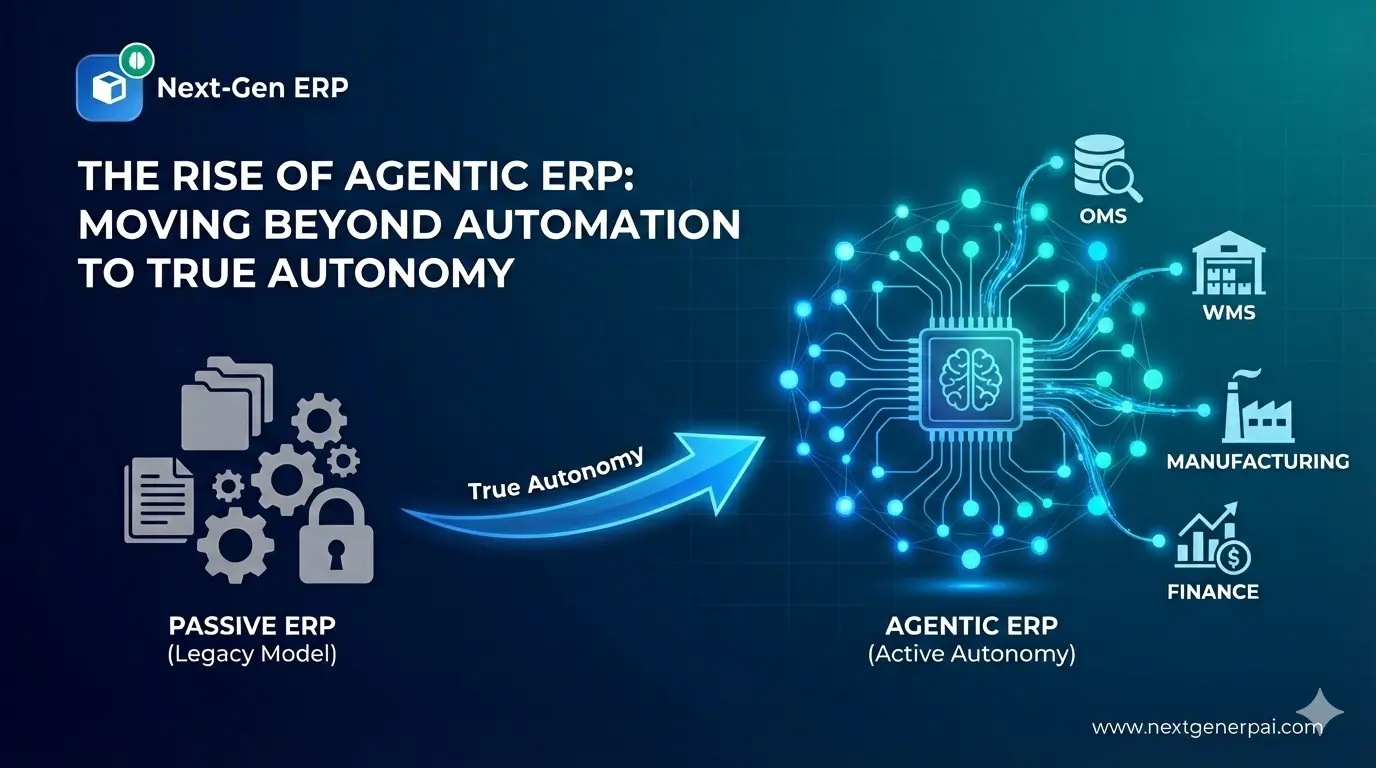
MCP for ERP is not just another integration trend. It is a disciplined way to connect AI agents with enterprise systems through approved tools, service contracts, and permission boundaries. For Moqui, Apache OFBiz, OMS, and WMS, MCP can help businesses move from passive AI assistance to secure AI execution.
The companies that succeed will not be the ones that give AI the most access. They will be the ones that give AI the right access, through the right services, with the right controls.