How to Install and Configure Apache OFBiz for Production
Most Apache OFBiz installations fail their first production week for the same reason: the team followed the quick start guide. The quick start guide is excellent at what it is designed to do, which is get a working ERP on a laptop in twenty minutes using an embedded database and a full set of demo data. A production deployment inverts almost every one of those defaults. You need a real database, no demo data, a hardened security configuration, TLS terminated at a reverse proxy, a managed service wrapper, a patch strategy, and a customization approach that survives the next upgrade. This guide walks through the entire path from a bare Linux server to a production Apache OFBiz instance you can actually operate, with the configuration files, commands, and decisions laid out in the order you will hit them.
The instructions here assume you are deploying on a Linux server with PostgreSQL, which is the most common production combination and the one we use for most client work at Next-Gen ERP. Where a choice is open, the trade-offs are called out rather than hidden behind a recommendation.
What Production-Ready Actually Means for Apache OFBiz
Apache OFBiz is a full ERP framework with embedded Tomcat, an embedded transaction manager, an entity engine that generates and maintains your database schema, and a service engine that runs both synchronous business logic and scheduled asynchronous jobs. Out of the box it is configured for evaluation. Understanding exactly which defaults change is the difference between a deployment that runs for years and one that gets rebuilt in month four.
| Concern | Quick start default | Production requirement |
|---|---|---|
| Database | Embedded Apache Derby | PostgreSQL, MySQL, Oracle, or SQL Server |
| Data loaded | seed, seed-initial, demo, ext | seed and seed-initial only, plus your own data |
| Admin user | admin with a known default password | Named accounts, rotated credentials, enforced policy |
| Web tier | Direct access on ports 8080 and 8443 | Reverse proxy on 443, application ports firewalled |
| TLS | Self-signed development certificate | Certificate authority issued certificate at the proxy |
| Process management | Foreground Gradle task | systemd service with defined JVM heap and restart policy |
| Logging | Console plus local log file | Rotated files shipped to a central log platform |
| Customization | Edits to framework and applications directories | Separate plugin component that layers on top |
| Upgrades | Not considered | Tracked release series with a tested patch cadence |
| Backups | None | Database dumps plus the runtime directory, restore tested |
If you are still deciding whether OFBiz is the right platform at all rather than how to deploy it, our open-source ERP evaluation framework covers the selection question with a weighted scoring model, and the Apache OFBiz implementation cost breakdown covers what the full programme costs once infrastructure, customization, and support are included.
Step 0: Choose the Right Release Series Before You Download Anything
This is the single decision that causes the most pain later, and it is the one most tutorials skip. OFBiz releases are named by feature freeze date, so 24.09 means the branch was frozen in September 2024 and every subsequent 24.09.xx release is a bug fix and security release on that same feature set. Always take the highest patch number in your chosen series.
| Release series | Feature freeze | Minimum JDK | Security maintenance status | Suitable for a new production build? |
|---|---|---|---|---|
| 24.09.x | September 2024 | Java 17 JDK | Actively receiving security fixes, with a large batch of CVE fixes landing in 24.09.06 during 2026 | Yes, this is the default choice |
| 18.12.x | December 2018 | Java 11 JDK | Last patch release was 18.12.19 in April 2025, and recent vulnerability fixes have been published only against the 24.09 line | Only for existing installs, and only with a funded upgrade plan |
| 17.12.x and earlier | 2017 and earlier | Java 8 | Not maintained | No |
Two practical consequences follow. First, if you are starting fresh in 2026, install the latest 24.09 patch release and provision a Java 17 JDK. Second, if you have inherited an 18.12 instance, treat the upgrade to 24.09 as a scheduled project rather than a background task, because the security fix stream has moved on. The authoritative list of releases lives on the Apache OFBiz download page, and the running list of known vulnerabilities and the exact release each was fixed in is published on the Apache OFBiz security page. Both should be bookmarked by whoever owns the platform.
Step 1: Size and Prepare the Server
OFBiz is a JVM application with a chatty relational workload, so it wants memory and fast storage more than it wants cores. The figures below are practical starting points for a single tenant deployment, not benchmark results, and real sizing should follow a load test against your own order volumes and report queries.
| Deployment tier | Concurrent users | Application node | Database node | Storage |
|---|---|---|---|---|
| Pilot or UAT | Under 15 | 4 vCPU, 8 GB RAM, 2 GB heap | Shared with application node | 60 GB SSD |
| Small production | 15 to 40 | 4 vCPU, 16 GB RAM, 4 GB heap | 4 vCPU, 16 GB RAM | 150 GB SSD, separate volume for the database |
| Mid production | 40 to 120 | 8 vCPU, 32 GB RAM, 8 GB heap | 8 vCPU, 32 GB RAM | 300 GB SSD plus WAL volume |
| Large or multi-node | 120 and above | 2 or more nodes at 8 to 16 vCPU, 32 GB RAM each | 16 vCPU, 64 GB RAM with a read replica | 500 GB and above, provisioned IOPS |
Base operating system preparation on a Debian or Ubuntu host looks like this. Adjust package names for RHEL derivatives.
sudo apt update && sudo apt upgrade -y
sudo apt install -y openjdk-17-jdk unzip gnupg curl postgresql nginx
sudo useradd --system --create-home --home-dir /opt/ofbiz --shell /bin/bash ofbiz
java -version
Set the timezone and locale explicitly on the host and later in the JVM arguments. OFBiz stores timestamps in the database using the JVM timezone, and a mismatch between application nodes is one of the harder classes of bug to diagnose after the fact. Running everything in UTC and handling display conversion in the user profile is the cleanest option.
Step 2: Download and Verify the Release
Download the release archive and verify it before you unpack it. Signature verification takes two minutes and protects you against a compromised mirror, which is not a theoretical risk for a widely deployed ERP.
cd /tmp
curl -O https://downloads.apache.org/ofbiz/apache-ofbiz-24.09.07.zip
curl -O https://downloads.apache.org/ofbiz/apache-ofbiz-24.09.07.zip.asc
curl -O https://downloads.apache.org/ofbiz/apache-ofbiz-24.09.07.zip.sha512
curl -O https://downloads.apache.org/ofbiz/KEYS

sha512sum -c apache-ofbiz-24.09.07.zip.sha512
gpg --import KEYS
gpg --verify apache-ofbiz-24.09.07.zip.asc apache-ofbiz-24.09.07.zip

sudo unzip apache-ofbiz-24.09.07.zip -d /opt
sudo mv /opt/apache-ofbiz-24.09.07/* /opt/ofbiz/
sudo chown -R ofbiz:ofbiz /opt/ofbiz
Substitute the current patch version for the one shown above, since the 24.09 series continues to receive releases. Read the INSTALL and README files in the extracted directory before proceeding, because they carry release specific notes that no third party guide can keep current.
Step 3: Understand the Reference Architecture You Are Building Toward
Before touching configuration files, it helps to have the target shape in mind. A production OFBiz deployment is not a single process on a single box even when it starts that way, and the boundaries you draw now determine how painful horizontal scaling is later.
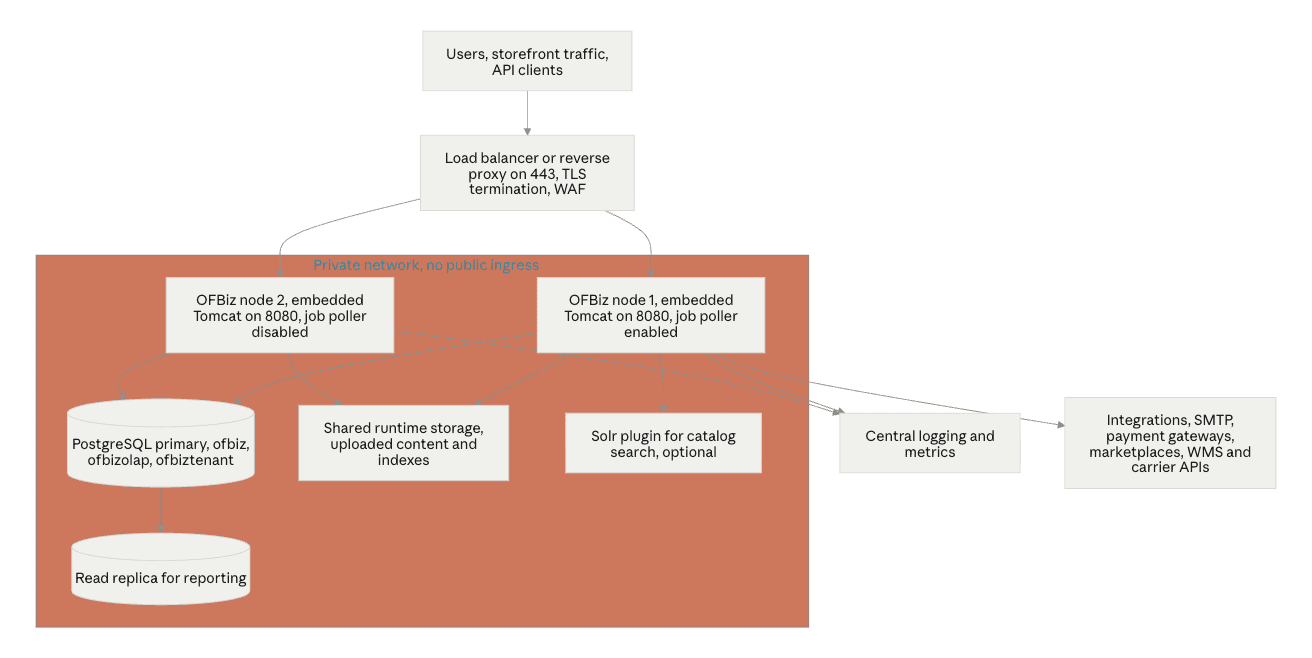
The important structural rules in that diagram are that application ports are never publicly reachable, that only one node polls the job queue unless you have deliberately partitioned service pools, and that anything stateful written by the application to local disk becomes shared storage the moment you add a second node. Teams that plan for this early can add capacity in an afternoon. Teams that do not end up rebuilding the deployment. If you are also connecting OFBiz to fulfilment and channel systems, the same private network discipline applies to the modern order management and warehouse management integration points.
Step 4: Configure the Production Database
Derby is fine for a laptop and unacceptable in production. It offers no meaningful concurrency story, no operational tooling, and no realistic backup and recovery path for a system of record. PostgreSQL is the most widely used production choice in the OFBiz community and the one with the least friction.
Create the databases and role
OFBiz uses three entity groups, each of which maps to a datasource. In practice most deployments give each group its own database on the same PostgreSQL instance.
| Entity group | Purpose | Typical database name |
|---|---|---|
| org.apache.ofbiz | Main transactional schema, the vast majority of entities | ofbiz |
| org.apache.ofbiz.olap | Reporting and analytical star schema entities | ofbizolap |
| org.apache.ofbiz.tenant | Multi-tenant registry, used only when multitenancy is enabled | ofbiztenant |
CREATE USER ofbiz WITH PASSWORD 'use-a-generated-secret-here';
CREATE DATABASE ofbiz OWNER ofbiz ENCODING 'UTF8';
CREATE DATABASE ofbizolap OWNER ofbiz ENCODING 'UTF8';
CREATE DATABASE ofbiztenant OWNER ofbiz ENCODING 'UTF8';
Add the JDBC driver
The PostgreSQL driver is not bundled. Either add it as a runtime dependency in build.gradle or place the driver jar where the entity engine can load it.
dependencies {
    runtimeOnly 'org.postgresql:postgresql:42.7.4'
}
Edit entityengine.xml
The file lives at framework/entity/config/entityengine.xml. Point the default delegator at your PostgreSQL datasources and define those datasources with a connection pool sized for your workload.
<delegator name="default" entity-model-reader="main"
           entity-group-reader="main" entity-eca-reader="main"
           distributed-cache-clear-enabled="false">
    <group-map group-name="org.apache.ofbiz" datasource-name="localpostgres"/>
    <group-map group-name="org.apache.ofbiz.olap" datasource-name="localpostgresolap"/>
    <group-map group-name="org.apache.ofbiz.tenant" datasource-name="localpostgrestenant"/>
</delegator>

<datasource name="localpostgres"
        helper-class="org.apache.ofbiz.entity.datasource.GenericHelperDAO"
        field-type-name="postgres"
        check-on-start="true"
        add-missing-on-start="true"
        use-fk-initially-deferred="false"
        alias-view-columns="false"
        join-style="ansi"
        use-binary-type-for-blob="true"
        use-order-by-nulls="true"
        result-fetch-size="50">
    <read-data reader-name="seed"/>
    <read-data reader-name="seed-initial"/>
    <read-data reader-name="ext"/>
    <inline-jdbc
        jdbc-driver="org.postgresql.Driver"
        jdbc-uri="jdbc:postgresql://10.0.1.20:5432/ofbiz"
        jdbc-username="ofbiz"
        jdbc-password="use-a-generated-secret-here"
        isolation-level="ReadCommitted"
        pool-minsize="5"
        pool-maxsize="100"
        time-between-eviction-runs-millis="600000"/>
</datasource>
Three production notes on this file. The demo reader is deliberately absent from the datasource definition, which is a useful belt and braces measure against someone accidentally loading demo data later. The connection pool maximum should be reconciled with your PostgreSQL max_connections setting across all application nodes plus any external tooling, because exhausting the database side of that budget produces failures that look like application bugs. And because the database password sits in this file in plain text, entityengine.xml must be treated as a secret: owned by the service user, permissions set to 600, excluded from version control, and injected at deploy time from your secret manager.
Once the schema is stable, many teams set check-on-start and add-missing-on-start to false in steady state and re-enable them only during controlled upgrade windows. This prevents the application from silently issuing DDL against your system of record and makes schema changes an explicit, reviewed event.
Step 5: Load Seed Data, Never Demo Data
This is the step that separates a clean production instance from one that will embarrass you in a board demo. The convenient loadDefault task loads demo companies, demo products, demo customers, demo orders, and demo user logins. Once that data is in your general ledger it is very difficult to remove cleanly.
| Command | What it loads | Use in production |
|---|---|---|
./gradlew cleanAll loadDefault | seed, seed-initial, demo and ext readers | Never |
./gradlew "ofbiz --load-data readers=seed" | Framework configuration, permissions, service and screen definitions, reference data | Yes |
./gradlew "ofbiz --load-data readers=seed,seed-initial" | The above plus initial records required for a working instance | Yes, this is the production baseline |
./gradlew "ofbiz --load-data readers=seed,seed-initial,ext" | The above plus external general data such as extended geographic and tax reference sets | Yes, if you need those reference sets |
./gradlew loadAdminUserLogin -PuserLoginId=yourname | Creates a single administrative login | Yes, then rotate the password immediately |
./gradlew "ofbiz --load-data file=/path/to/your-company-data.xml" | Your own organisation, chart of accounts, facilities, product data | Yes, this is where your real setup lives |
The production sequence therefore looks like this.
sudo -u ofbiz -i
cd /opt/ofbiz
./gradlew cleanAll
./gradlew "ofbiz --load-data readers=seed,seed-initial,ext"
./gradlew loadAdminUserLogin -PuserLoginId=erpadmin
./gradlew build
The admin login created by that task is issued with a default password and flagged to require a password change at first login. Change it before the instance is reachable from anywhere, and treat that account as a break-glass credential rather than a daily driver. Your real setup data, meaning your legal entity, chart of accounts, facilities, product catalogue, and party records, should be authored as versioned entity XML files or migrated from the legacy system as part of a repeatable load script. Doing this by hand through the web interface means you cannot rebuild the environment, which means you cannot have a trustworthy staging environment, which means every change goes straight to production. For anything beyond a single legal entity this data modelling work is usually the largest slice of the project, and it is where our ERP migration to open-source platforms practice spends most of its time.
Step 6: Configure Hostnames, Ports, and TLS
OFBiz ships with embedded Tomcat, so there is no separate application server to install. In production you still want a reverse proxy in front of it for TLS termination, request filtering, static asset caching, and the ability to restrict administrative paths by network.
Application side configuration
| File | Key settings | Why it matters |
|---|---|---|
framework/webapp/config/url.properties | port.http, port.https, force.https.host, port.https.enabled | Controls the URLs OFBiz generates in redirects and links. Set these to the public hostname and port 443, otherwise users get redirected to internal ports. |
framework/security/config/security.properties | host-headers-allowed | Requests arriving with an unlisted Host header are rejected. Failing to add your production hostname here is the most common cause of a blank page after a correct install. |
framework/base/config/ofbiz-containers.xml | Catalina connector definitions | Bind connectors to the private interface, and set standard Tomcat connector attributes such as proxyName, proxyPort, scheme and secure so the application knows it sits behind a proxy. |
framework/start/src/main/resources/start.properties | ofbiz.admin.host, ofbiz.admin.port, ofbiz.admin.key | The local admin socket used for graceful shutdown. Bind it to 127.0.0.1 and change the default key. |
framework/common/config/general.properties | Mail relay, default currency, default locale, instance identifier | Outbound mail and locale defaults that are easy to forget until an invoice fails to send. |
Reverse proxy configuration
server {
    listen 443 ssl;
    http2 on;
    server_name erp.example.com;

    ssl_certificate     /etc/letsencrypt/live/erp.example.com/fullchain.pem;
    ssl_certificate_key /etc/letsencrypt/live/erp.example.com/privkey.pem;
    add_header Strict-Transport-Security "max-age=31536000; includeSubDomains" always;

    client_max_body_size 64m;

    location / {
        proxy_pass http://127.0.0.1:8080;
        proxy_set_header Host $host;
        proxy_set_header X-Real-IP $remote_addr;
        proxy_set_header X-Forwarded-For $proxy_add_x_forwarded_for;
        proxy_set_header X-Forwarded-Proto https;
        proxy_read_timeout 300s;
    }

    location /webtools/ {
        allow 10.0.0.0/8;
        deny all;
        proxy_pass http://127.0.0.1:8080;
        proxy_set_header Host $host;
        proxy_set_header X-Forwarded-Proto https;
    }
}

server {
    listen 80;
    server_name erp.example.com;
    return 301 https://$host$request_uri;
}
Then close ports 8080 and 8443 at the firewall or security group so the only path to the application is through the proxy. The /webtools/ restriction matters more than it looks: that webapp exposes the entity engine, service invocation, and cache management tools, and it should never be reachable from the public internet even behind authentication.
Step 7: Run OFBiz as a Managed Service
Running ./gradlew ofbiz in a terminal is a development pattern. In production, build the jar once and run it under systemd with explicit heap settings and a restart policy.
[Unit]
Description=Apache OFBiz
After=network.target postgresql.service
Requires=postgresql.service

[Service]
Type=simple
User=ofbiz
Group=ofbiz
WorkingDirectory=/opt/ofbiz
Environment="JAVA_HOME=/usr/lib/jvm/java-17-openjdk-amd64"
ExecStart=/usr/lib/jvm/java-17-openjdk-amd64/bin/java \
  -Xms4096M -Xmx8192M -XX:+UseG1GC -XX:MaxGCPauseMillis=200 \
  -Duser.timezone=UTC -Dfile.encoding=UTF-8 \
  -XX:+HeapDumpOnOutOfMemoryError -XX:HeapDumpPath=/opt/ofbiz/runtime/logs \
  -jar /opt/ofbiz/build/libs/ofbiz.jar --start
ExecStop=/usr/lib/jvm/java-17-openjdk-amd64/bin/java -jar /opt/ofbiz/build/libs/ofbiz.jar --shutdown
SuccessExitStatus=143
Restart=on-failure
RestartSec=20
LimitNOFILE=65536

[Install]
WantedBy=multi-user.target
sudo systemctl daemon-reload
sudo systemctl enable --now ofbiz
sudo journalctl -u ofbiz -f
Set the initial and maximum heap to the same value in production so the JVM does not spend its early life resizing, and leave at least a third of system memory outside the heap for metaspace, thread stacks, direct buffers, and the operating system page cache. A heap dump path configured in advance is the difference between diagnosing an out of memory event once and waiting for it to happen again.
Step 8: Tune the Service Engine and Job Scheduler
The service engine configuration in framework/service/config/serviceengine.xml governs asynchronous and scheduled work: recurring accounting jobs, order processing, integration polling, and anything queued by your own services. The defaults are tuned for a demo instance.
| Setting | Default behaviour | Production guidance |
|---|---|---|
min-threads and max-threads | Small pool sized for a single user | Raise to match your job volume, typically 5 to 20 max threads for a mid-size deployment, then watch queue depth |
poll-enabled | Enabled on every node | Enable on exactly one node, or partition work using named pools with send-to-pool and run-from-pool |
poll-db-millis | Polls the job queue on a fixed interval | Lower for latency-sensitive integrations, raise to reduce database chatter |
purge-job-days | Retains completed job history briefly | Set deliberately, since the job history table grows quickly on busy instances |
failed-retry-min | Retries failed jobs after a short delay | Align with your integration partners' rate limits and alerting thresholds |
If you run more than one application node, this is where a quiet data corruption risk lives. Two nodes both polling the same job queue will occasionally process the same scheduled job twice. Decide explicitly which node owns the scheduler, and if you need job processing redundancy, use named pools so each node runs a distinct set of work rather than competing for the same set.
Step 9: Harden the Instance Before It Is Reachable
OFBiz is a mature Apache project with an active security team, a documented security model, and a solid cross-site request forgery defence in current releases. It has also had a meaningful number of published vulnerabilities, including pre-authentication issues, and a batch of CVE fixes landed as recently as the 24.09.06 release. None of that is unusual for a large enterprise Java codebase. What matters operationally is that an unpatched, internet-exposed OFBiz instance running demo credentials is an attractive target, and that this outcome is entirely avoidable.
| Hardening area | Action | Priority |
|---|---|---|
| Patch currency | Track the latest patch in your release series, subscribe to the OFBiz announce mailing list, and hold a standing monthly patch window | Critical |
| Demo credentials | Never load the demo readers, and confirm no default logins exist in UserLogin before go-live | Critical |
| Network exposure | Application ports bound to the private interface, public ingress only through the proxy on 443 | Critical |
| Administrative webapps | Restrict /webtools and any admin backoffice paths by source network at the proxy | Critical |
| Password policy | Configure keys such as password.length.min, max.failed.logins, and the password hash type in security.properties | High |
| Unused components | Remove or disable plugins and webapps you are not using, including sample and example components and any demo storefront | High |
| Serialization and remote protocols | Do not enable RMI, JNDI, or JMX endpoints unless required, and never expose them publicly | High |
| Permissions model | Build role-based security groups rather than granting broad administrative permissions to operational users | High |
| Transport security | TLS at the proxy with modern cipher suites, HSTS enabled, HTTP redirected | High |
| Filesystem | Application runs as an unprivileged user, configuration files with secrets at 600, no world-readable credentials | High |
| Audit and logging | Centralised logs with retention that satisfies your audit obligations, alerting on authentication failures | Medium |
The Apache OFBiz project maintains a "Keeping OFBiz secure" page on its wiki alongside the vulnerability list on the project security page, and both should be part of your platform runbook rather than something read once during installation.
Step 10: Customize Without Breaking Upgrades
This is where most long-lived OFBiz deployments succeed or fail, and it has nothing to do with installation mechanics. Every hour you spend editing files inside framework/ or applications/ is an hour you will spend again, with interest, at every upgrade. The framework provides a component model precisely so that your code can live beside the core rather than inside it.
./gradlew createPlugin -PpluginId=acme -PpluginResourceName=Acme -PwebappName=acme -PbasePermission=ACME
That produces a self-contained component under plugins/ with its own entity definitions, services, screens, and web application. Your extensions then follow a consistent pattern: new entities and fields declared in your component, existing entities extended rather than modified, service overrides and service event condition actions registered from your component, and screen customizations applied through decorators and screen overrides.
Keep your component in its own Git repository, pin the OFBiz release it is built against, and rehearse upgrades by restoring a production database backup into staging and running the upgrade there first. Teams that maintain this discipline can adopt a new patch release in a day. Teams that forked the core treat every upgrade as a merge project, which is exactly how organisations end up frozen on an unsupported release. This is the same discipline that underpins sustainable custom ERP development solutions regardless of the underlying framework, and it is one of the practical arguments in the wider open-source ERP versus proprietary ERP discussion: the freedom to modify everything is only valuable if you exercise it in a structured way.
Step 11: Backups, Monitoring, and Operational Readiness
An ERP without a tested restore is not in production, it is in an extended pilot. Two things need backing up and they are easy to conflate.
| What | How | Frequency | Notes |
|---|---|---|---|
| Database | pg_dump plus continuous WAL archiving or a managed snapshot policy | Nightly full, continuous WAL | Point-in-time recovery matters for an ERP, since a bad data load can be worse than an outage |
| Runtime directory | Filesystem snapshot or archive of runtime/ | Nightly | Holds uploaded content, generated documents, search indexes, and logs |
| Configuration | Version control plus secret manager | On every change | Configuration should be reproducible, not backed up as an artefact |
| Custom component | Git repository with tagged releases | On every change | Tag the exact commit deployed to production |
On monitoring, the signals that actually predict OFBiz incidents are JVM heap usage and garbage collection pause time, database connection pool utilisation, service engine job queue depth and failed job count, HTTP error rates and response time at the proxy, and disk usage on the runtime and database volumes. Log output lands in runtime/logs/, and the log4j2 configuration under framework/base/config/ controls levels and appenders. Ship those logs somewhere central before you need them.
Go-live validation checklist
| Check | Pass criteria |
|---|---|
| Clean startup | No ERROR entries in runtime/logs/ofbiz.log during a cold start |
| Public access | Login succeeds over HTTPS on the production hostname with no mixed content or redirect loops |
| Port exposure | External port scan shows only 443 open |
| Demo data absence | No demo party, product, or user login records present |
| Transaction path | A test order flows from capture through allocation, fulfilment, invoicing, and payment |
| Scheduled jobs | A scheduled job executes on time and the job history shows success |
| Outbound mail | System notifications and document emails deliver and pass authentication checks |
| Restore rehearsal | A production backup restores into staging and the application starts against it |
| Version currency | The running release matches the latest patch in your series |
| Rollback plan | Documented, and executed once in staging |
Common Production Mistakes and What They Cost
| Mistake | What happens | Correction |
|---|---|---|
Running loadDefault on the production server | Demo companies, products, and postings mixed into your ledger, usually discovered during the first close | Rebuild with seed and seed-initial only, then load your own data |
| Staying on embedded Derby | Concurrency failures and corruption under real load, no viable recovery path | Migrate to PostgreSQL before go-live, not after |
| Leaving default administrative credentials | Trivially exploitable, and the project explicitly warns against demo credentials in production | Named accounts, rotated secrets, enforced policy |
| Exposing 8080 or 8443 publicly | TLS, WAF, and path restrictions all bypassed | Reverse proxy only, application ports firewalled |
| Skipping patch releases | Accumulating exposure to published vulnerabilities including pre-authentication issues | Standing monthly patch window with staging validation |
| Editing core framework files | Every upgrade becomes a manual merge, and the platform eventually freezes | Own plugin component with entity and screen extensions |
Forgetting host-headers-allowed | Blank pages or rejected requests that look like a proxy fault | Add every hostname the application is served on |
| Two nodes both polling jobs | Duplicate scheduled job execution and duplicate downstream side effects | One scheduler owner, or partitioned service pools |
| Configuring setup data through the UI only | Environments cannot be rebuilt, so staging drifts from production | Author setup data as versioned XML load files |
| No staging environment | Schema and data changes are validated in production by your users | Staging restored from production backups on a schedule |
Where AI Fits Into an Apache OFBiz Production Stack
A correctly deployed OFBiz gives you something most ERP estates lack: a complete, well-modelled transactional data set and a service engine that can be invoked programmatically for essentially any business operation. That combination is the actual prerequisite for automation, and it is why the sequencing matters. Intelligent automation layered on a messy deployment amplifies the mess.
Once the platform is stable, the practical entry points are usually document-heavy processes and exception handling. AI-powered document processing removes manual entry from supplier invoices, purchase orders, and shipping documents by turning them into structured service calls. Exception queues in order management and procurement are the next candidates, because they are high volume, rule-bound, and expensive in human attention. Beyond that, AI ERP solutions and an agentic ERP architecture treat the OFBiz service layer as a set of tools that autonomous agents can call under policy, with the entity engine providing the audit trail that makes such automation defensible.
It is also worth noting that OFBiz is not the only option in this space. Moqui was written by one of the original OFBiz architects and offers a lighter, more modern framework with a compatible data model heritage, which makes it a serious alternative for greenfield builds. Our Moqui ERP development and consultancy practice exists alongside our Apache OFBiz ERP development services precisely because the right answer depends on your starting point, your team, and how much of the OFBiz application layer you actually intend to use.
Frequently Asked Questions
Is Apache OFBiz production ready?
Yes. Apache OFBiz is a top-level Apache Software Foundation project used in production by manufacturers, distributors, and retailers, and it includes accounting, order management, inventory, manufacturing, and e-commerce applications. The qualification is that production readiness is a property of your deployment rather than the download. The framework gives you the pieces, and the configuration, hardening, patching, and operational practices described above are what make it a production system.
Which database should I use for Apache OFBiz in production?
PostgreSQL is the most common and best-supported production choice, with MySQL, Oracle, and Microsoft SQL Server also supported through the entity engine. The embedded Derby database that ships with OFBiz is intended for evaluation and development only and should never be used for a system of record.
Which Apache OFBiz version should I install in 2026?
Install the latest patch release in the 24.09 series and provision a Java 17 JDK. The 18.12 series remains widely deployed but its last patch release was in April 2025, and recent security fixes have been published against the 24.09 line, so new deployments should not start there.
Do I need a separate application server such as Tomcat or JBoss?
No. OFBiz embeds Tomcat and a transaction manager, so it runs as a single Java process started from ofbiz.jar. You should still place a reverse proxy in front of it for TLS termination, request filtering, and path-level access control.
How long does a production Apache OFBiz deployment take?
A hardened single-node install with PostgreSQL, TLS, systemd, and backups is a one to three day exercise for an experienced engineer. The full programme, meaning data migration, chart of accounts and organisational setup, workflow configuration, integrations, customization, testing, and training, is measured in months and dominated by the data and process work rather than the installation.
Can Apache OFBiz run in Docker or Kubernetes?
Yes, and container images are a good fit for the application tier because the build artefact is a single jar. The constraint to plan for is that the runtime/ directory is stateful, holding uploaded content, generated documents, and search indexes, so it needs a persistent volume rather than ephemeral container storage. Job scheduler ownership also needs to be explicit rather than left to whichever replica starts first.
What is the most common cause of a failed OFBiz go-live?
In our experience it is not infrastructure. It is loading demo data into what becomes the production instance, and customizing the core framework instead of building a separate component. The first contaminates your financial records, and the second removes your ability to take security patches. Both are decisions made in the first week and paid for over years.
Final Thoughts
The mechanics of installing Apache OFBiz for production are well within reach of any competent Linux and Java engineer, and this guide covers them end to end. The decisions that determine whether the deployment lasts are made around the installation rather than during it: which release series you commit to, whether your setup data is reproducible, whether your customizations live outside the core, and whether you have an operational cadence for patching and restore testing. Get those four right and OFBiz is a durable, low-licence-cost foundation for order management, inventory, manufacturing, and finance. Get them wrong and no amount of infrastructure sophistication will save the deployment.
If you are planning an OFBiz production build, migrating off a legacy ERP, or trying to rescue a deployment that has drifted from upstream, our team works on exactly this class of problem across manufacturing, retail, healthcare, e-commerce, and distribution. The best time to design the deployment architecture is before the first data load, not after the first incident.